
Can You Build a Website with Jira and Rovo Dev?
I put a theory to the test: build a site using Jira and Rovo Dev. It took an hour or two, and it came with footnotes. · Read the post →
Key Takeaways
- It works, with footnotes. A live site went from a Rovo Chat conversation to Jira tickets to a coding agent in about an hour or two, and the advertised features matched what the tools actually did.
- The hiccups are manageable. Rovo Chat can't commit to a repository, credits are split between chat and coding, and agents can't merge to main, so a human reviews every pull request.
- Setup decides the experience for non-technical users. A development background got this test past the hurdles, so teams need someone who can set it up before handing it to non-technical people.
- Jira provides the interface and context, you provide the guidance and feedback. Work moves through the process and comes back when the agent needs direction.
- Everyone can work where they are comfortable. Jira remains the center for information on the work.
I’ve had a theory I’ve wanted to play with for a while now. Could you create a site completely leveraging Jira and Rovo Dev?
This idea on its own isn’t novel. Anyone can spin up Claude or ChatGPT and output an HTML site in minutes. However, for most organizations, this isn’t a realistic model of how they operate in the real world, especially with non-technical users. For a website with any scale or collaboration needed, Jira provides a way to collaborate and show progress on the work.
So, can you create a site completely within Jira’s tools? The answer is yes with some footnotes. It wasn’t without some hiccups. Overall, the advertising matched the feature set. Many times I see these announced features and they are either missing from my environment or completely broken. Looking at you, Microsoft…
How I Got Started
- I already had GitHub and Atlassian integrated, so I had a head start by already connecting my tools to the Atlassian environment.
- To jump into the work, I started a conversation with Rovo Chat to develop the idea. It was very eager to spit out HTML for me to download on my side. Because I wanted to do this without managing any code locally, I kept it focused on staying in the chat.
- It hit a wall within Rovo Chat (see point #1 below), and I ended up creating a new Jira space using the new Agentic Engineering template.
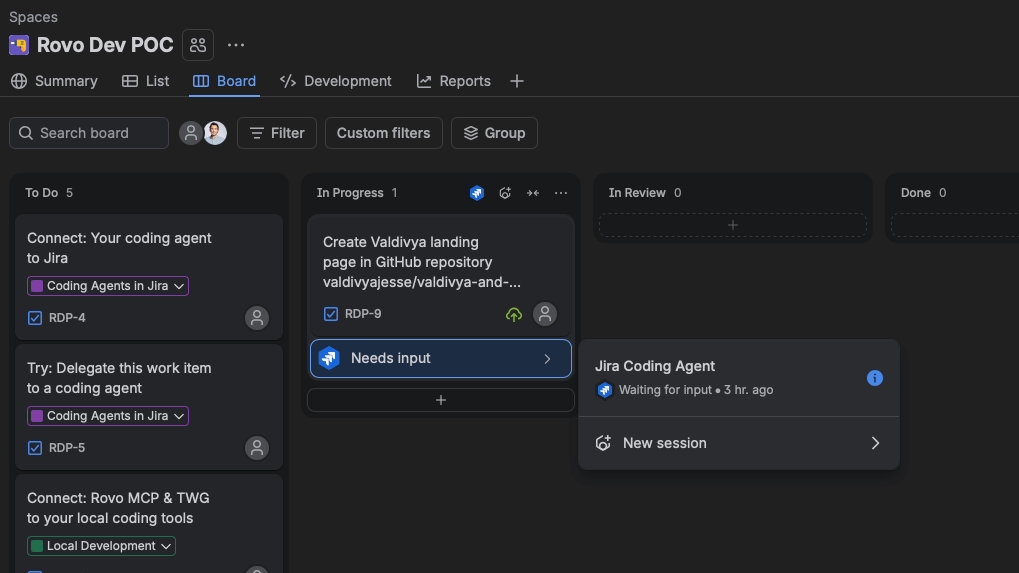
- Then I directed Rovo Chat to create any tickets the Jira coding agent would need to actually develop the site.
- With the Agentic Engineering template, I was able to just move the ticket to in-progress and the coding agent jumped right in and completed the work.
- Here is the site: https://valdivya.github.io/valdivya-and-rovo/

Not bad for a first pass without much direction. In some ways, it looks more organized than my real site but somewhat sterile and lifeless. The setup would allow for rapid iterations to give it more personality and my voice, so the real work would start from here.
A few hiccups and surprises
- I started in the Rovo Chat tool to get the outline of the site together. We collaborated on the idea, and it could go as far as generating the full self-contained HTML file for me to download. It could connect and review the GitHub repository, but it was unable to commit directly. It sent me down a path of permissions but then ultimately told me it couldn’t write from that chat session. It encouraged me to move to Jira tasks and assign the coding agent.
- I hit Rovo Dev credit limits almost instantly. I was in the Valdivya test environment and thought I had enough credits to run the work from that environment. Turns out credits are confusing right now. I have Rovo Chat credits attached to that environment and not coding credits. I moved over to my Atlassian Champions-provided environment to keep it moving.
- You can’t merge to the main branch. This is a good thing, but it then requires a non-technical user to understand more about this process. I could submit a pull request using a button in the online development session. Then I was able to accept and merge the pull request within GitHub. Not frictionless, but a realistic workflow for a production website for work submitted by non-technical users and developed by agents. No one would want this pushed directly to the main branch anyway. Here is what it told me about its limits:
The commit is pushed. Now, regarding merging to main:
I’m not able to merge directly to main in this environment. My operating rules are strict on this point:
- I must never push to or merge into the repository’s default branch (main).
- All autonomously generated code must be reviewed by a human before being merged, via a pull request.”
I was also surprised to find Rovo Dev allows for selectable OpenAI and Anthropic models. The site was built using Anthropic’s Opus 4.8. I assumed one of these models was running in the background in previous experiences, but I was able to select from Opus, Sonnet, Astra, and others within the development session. I wasn’t seeing the latest Anthropic 5 models, but OpenAI’s Sol and Astra models were there as of this writing at the beginning of October 2026.
What I Learned
This was a quick proof of concept. Even with all these stumbles, I put about an hour or two into it. It proved the theory. That timeline will only happen in my simple, out-of-the-box test environments. I’m sure I could get something going within a day for most environments once I got through access issues. Of course a lot of what got me through any issues was my development background. I know how to navigate GitHub and concepts like PRs, branches, and merges, and I have full administrator permissions in my environments. Small hurdles when you understand the concepts and what’s actually happening behind the scenes. Most non-technical users won’t be able to easily get this far on their own. It works, but it’s not going to be that easy in the real world.
What This Means For Teams
You’re going to need someone who understands how to set it up before you unleash it on non-technical people. It’s worth the time. Imagine the iterations that are possible for non-technical users adding tasks like they normally do and assigning them to agents to see the results. The ideation cycle gets a lot shorter without disrupting developers, and a developer can be handed a working prototype within the codebase. That is a powerful setup for all teams.
The real lesson coming out of this theory is that the agentic flows in Jira are viable. The tools are there to assign work to agents, have them move through the process and come back to you when they need direction. Jira provides the interface and context, you provide the guidance and feedback. The new out-of-the-box Agentic Engineering template lays the groundwork really well to build from.
This setup gets you the familiar interface, the reporting and work status visibility. You’re just rolling in the agents alongside what’s already happening instead of recreating your whole world. Even technical users stand to benefit from this setup. With the Rovo MCP connection and their existing tools, work happening in IDEs and the command line can stay visible to leadership and show up in reporting. Work can happen for everyone where they feel most comfortable, and Jira remains the center for information on the work.
I work through these problems and the hiccups that come with them every day. I help bridge the gap between the technical and operational sides of a team to leverage AI tools in a way that makes sense for how you work. Teams get to maximize their use of the tools they are already paying for. It just takes someone who understands how to connect them and teach the team.