
How To Get The Most Value Out Of Your Microsoft 365 Copilot Subscription
Microsoft keeps announcing features that never show up in your environment. If you're paying for a Copilot license and wondering where everything is, it's usually a configuration problem. · Read more →

Microsoft just released Copilot Cowork, a new feature built on Anthropic's Cowork, and most organizations won't see it in their environment without making changes. I've found organizations are missing configuration settings that will help them maximize their Copilot license. Microsoft makes big announcements on these features but getting access to them requires more work than it should.
The Microsoft 365 Copilot license for business packs a lot into the subscription cost. As I write this in April 2026, Microsoft is currently running a great deal for 15% off the Copilot small business license for annual commitments. That brings the monthly total to $18.90 per user per month for that first year. That's worth it for the improvements it brings to Teams Meeting Recaps, Microsoft 365 Search, Facilitator note-taking, and environment security.
There is incredible value in the license, but what I've found is availability for these features is fractured, unclear, and requires administration to maximize the value from the license.
When you take a step back, Microsoft 365 Copilot for Business gives you access to models from OpenAI, Anthropic, out-of-the-box agents like Research and Analysis, and integrations throughout their office apps. The model options are still expanding too. As part of writing this post, I found there is also an xAI setting for Copilot Studio models that I was not aware of. I imagine we will continue to see more model choice extended across the ecosystem. Microsoft recently announced Critique and Council features that bring OpenAI's and Anthropic's models together. Using both models together is something I've done manually to get to a better solution by having them play off of each other. Having access to both models is another example of what this package should offer to organizations in the Microsoft ecosystem without paying for separate ChatGPT and Claude licenses.
The reality is that even with these features available across Microsoft products, they just don't quite hit the mark with the latest offerings from Anthropic and OpenAI. Compare the GPT model in Copilot against the same model in ChatGPT and you'll find better responses in the official ChatGPT app. Microsoft is focused on making improvements and continues to invest heavily.
There are big announcements for new products and features from Microsoft that aren't available in your environment. Finding that information usually requires reading the fine print or digging around. It's frustrating. Once features are released, many don't do what is advertised. The Microsoft 365 App Builder Agent is just broken. I've fought with it in multiple environments. I've tried it when it was first released and gave it a shot multiple times in the last few months. Why release it at all in this state? I wouldn't even consider this an alpha build. I can understand why you might be frustrated with Copilot.
The point of this post isn't to point out the downsides of these features but to present the reality of what it takes to understand what works and what doesn't for organizations. It's work I'm deeply involved in helping teams sort through. There is value in the Copilot product, especially for organizations already in the Microsoft ecosystem. Honestly, it's needlessly complicated and not something most organizations are going to take the time to work through on their own. When OpenAI and Anthropic announce something, it's usually available as a simple toggle to enable for enterprise within a week of their announcement.
Before we dive in, let me caveat one thing
I'm an operations and AI enablement consultant, not an in-house IT administrator. That outside perspective is exactly what this post is based on. I am pointing out settings to help raise awareness on the latest updates in your environment for Microsoft's Copilot. Your governance, security, and team readiness for bleeding-edge features should decide how and when to enable this functionality. I would advise pushing your boundaries to help drive your organization forward rather than maintaining the status quo.
So where should you start?
The first place to go is to enable the Copilot Frontier features within Copilot settings of your Microsoft Admin Portal. You'll find many of the announced features are not available in your environment without it. In my experience, you won't have access on Day 1 but it will get you moved up in the line ahead of the standard release cycle.
Enable Copilot's Frontier Features
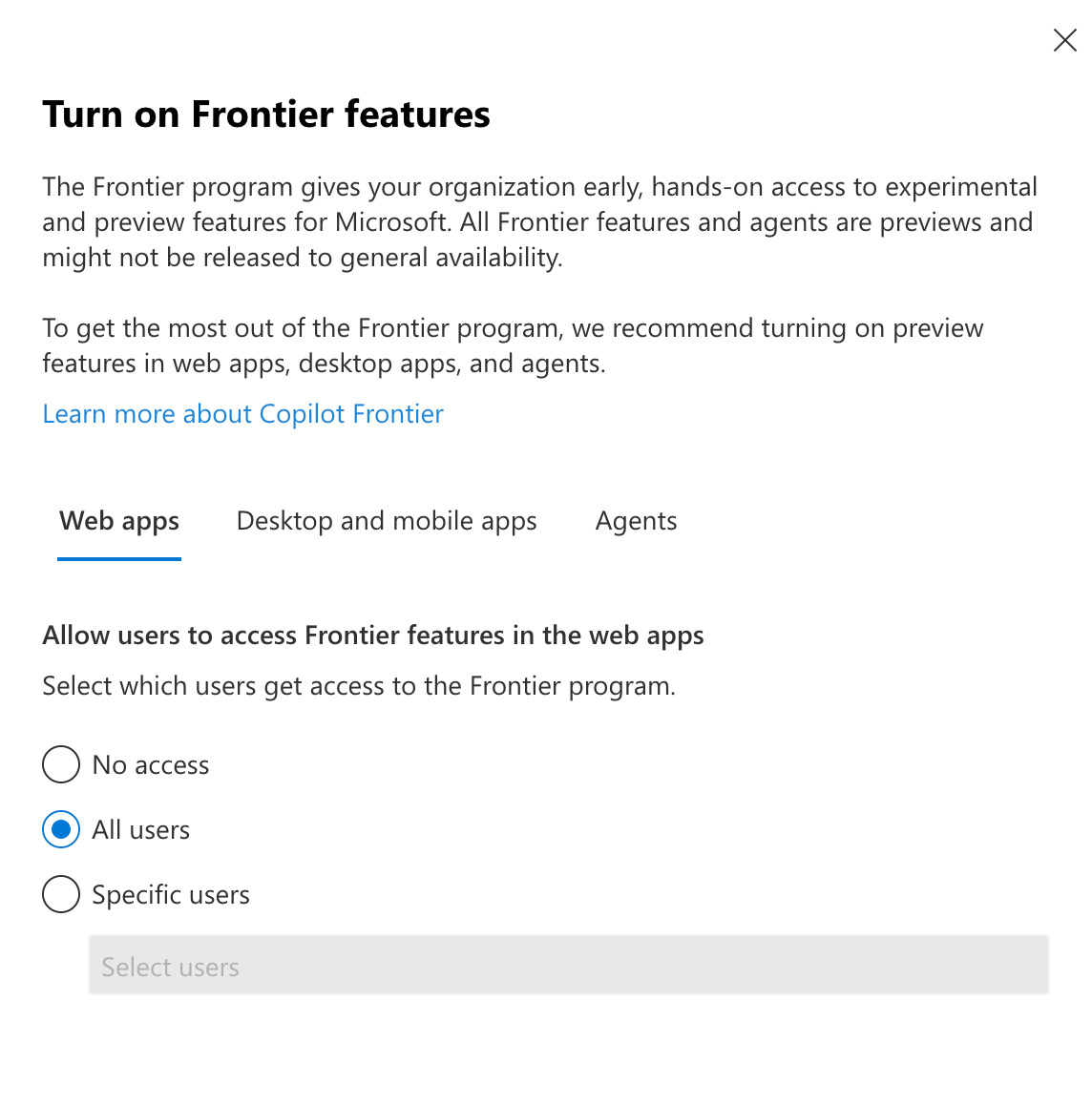
You may be wondering if this is safe to enable across your organization.
You'll have to decide if enabling this for all users is right for you but I would recommend giving access to your most advanced AI users, IT administrators, and those that can handle early access features. For every broken App Builder Agent, there is Anthropic model selection, quality of life features, and Researcher agents.
My personal philosophy on this setting is that a lot of these AI features are moving fast and it's better to give users access to try things than to leave it blocked. Your users are also seeing announcements and may be curious. I'd advise you find your way into having access to the Frontier features and push your organization forward.
Set Yourself Up for Targeted Releases Across Your Microsoft 365 Environment
Within your organization settings in the Microsoft Admin, you have the option to enable a more rapid release cycle for your Microsoft 365 environment. By default, your environment will be on the standard release. Consider switching to the targeted release cycle for everyone or groups of users. In combination with the Copilot Frontier settings, you'll get access to the latest features across your Microsoft environment.
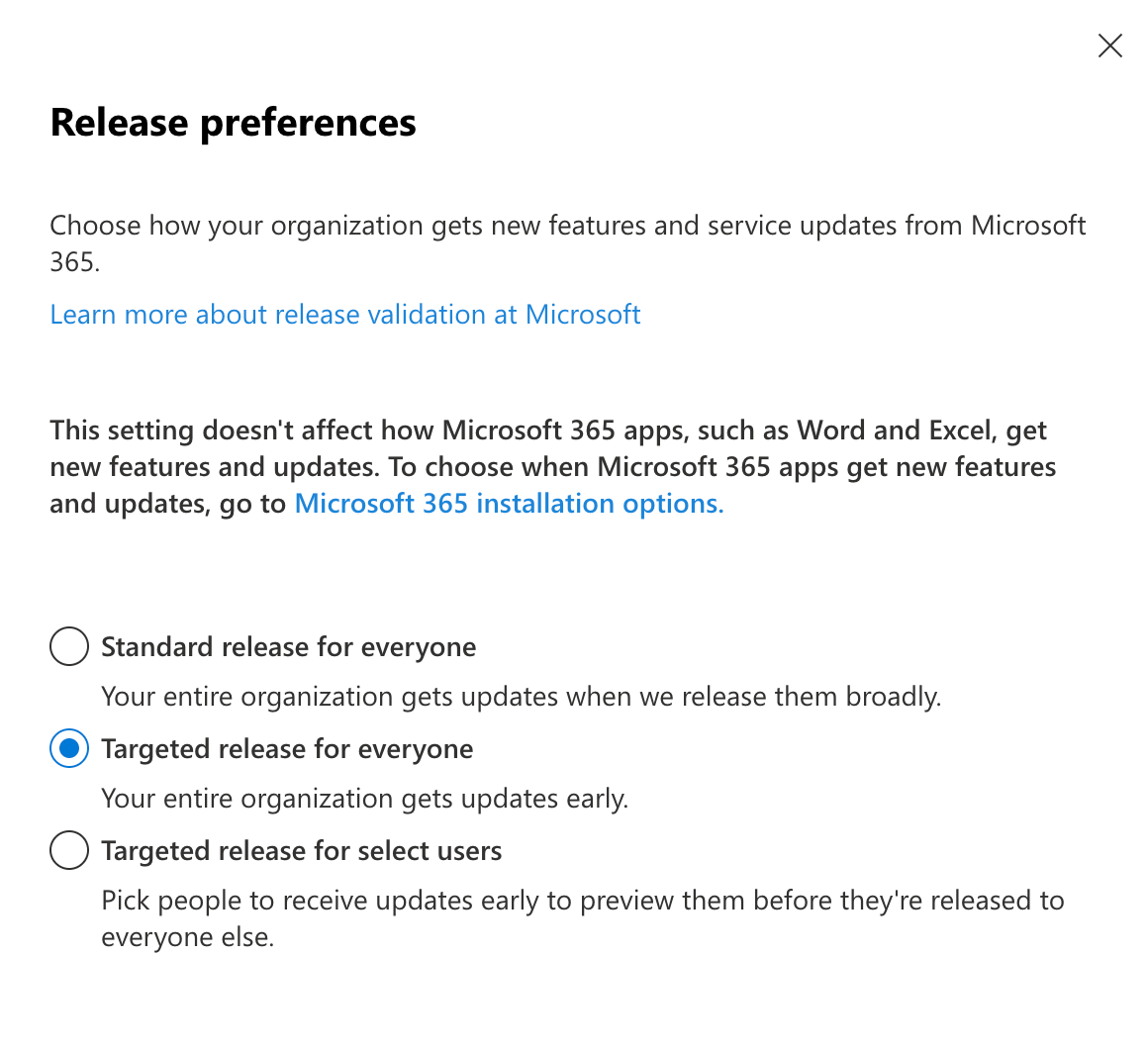
Configure Microsoft 365 App Release Installation Options
Also under the organization settings is the option for releasing updates more rapidly for installed apps. The default for a new environment right now is the Current Channel but I would suggest taking a look in your environment to make sure it's set correctly. The Current Channel ensures your installed apps receive the latest updates automatically.
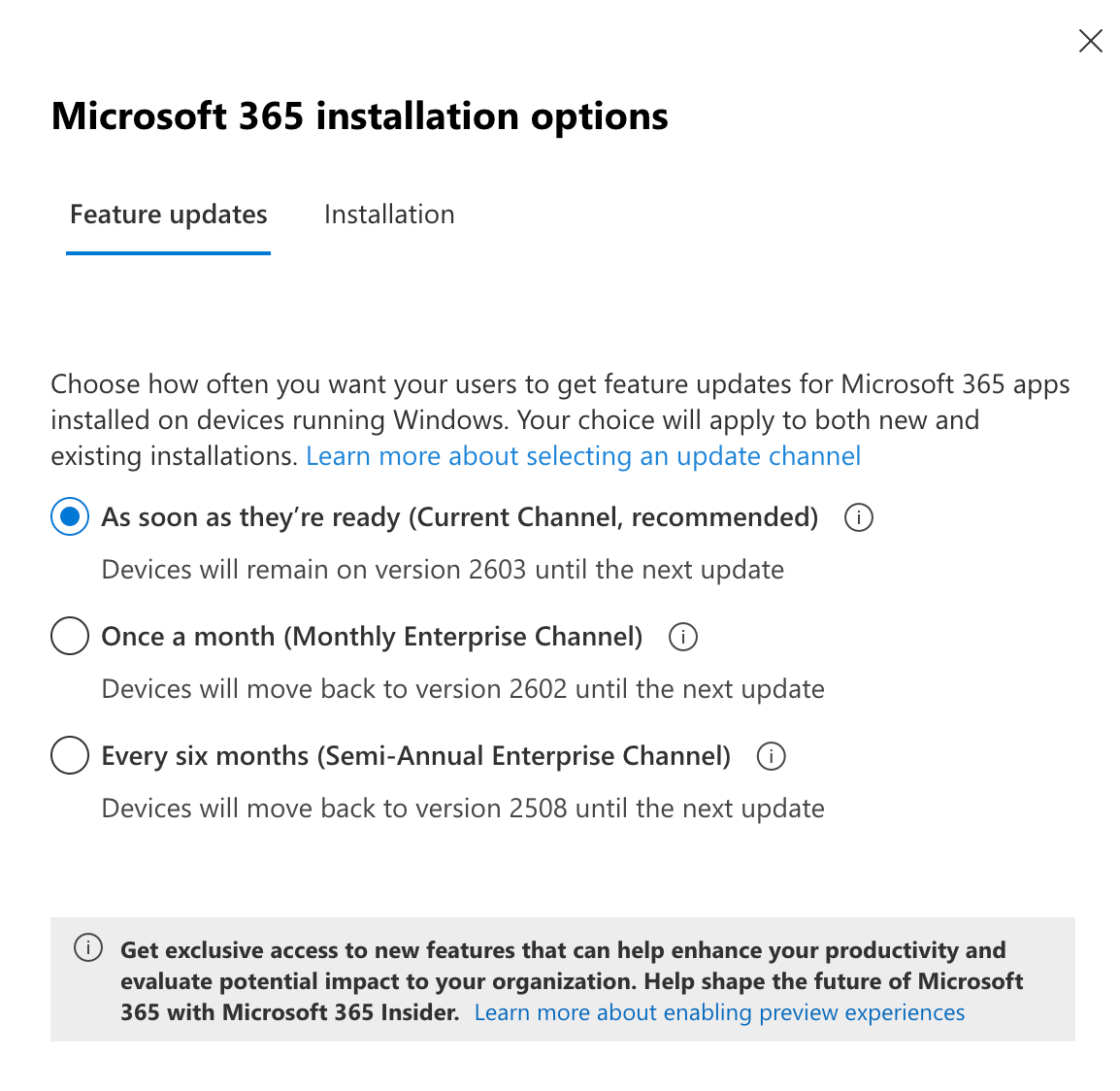
Once these settings are enabled, there are still no guarantees
You're still at the mercy of Microsoft's release schedule. I've seen administrators get access to features weeks after others in the same release cycles. Keep your apps up to date, keep your system up to date, cross your fingers, and you should have the latest updates.
For a one-person organization like mine, these settings are a no-brainer. I think it's a safe bet for small businesses to be able to maximize the value of your Copilot subscription too. For larger, risk-averse, or less technical organizations, I'd advise running pilot programs to introduce features. I would challenge anyone to push themselves beyond their comfort zone so you can get real value from the tools. Now is not a good time to gatekeep.
Your Microsoft 365 Copilot Value Maximization Takeaways
- Enable those Frontier features. You're paying for the licenses, so get the most out of them by having access to the latest AI tools from Microsoft. Most of the features Microsoft is announcing aren't available in your environment until you turn it on.
- Configure Microsoft 365 Release Preferences. The AI tools work alongside Microsoft's ecosystem releases, so to make sure your environment can use the latest features, move to a targeted release group. Without this, you could be waiting months longer for features you're already paying for.
- Review your Microsoft 365 App Installation Options. Turn on the current channel updates to be on the latest app releases installed on your devices. These features all work together, so to make sure your apps can use the latest Copilot functionality, get on the rapid release track.
None of this is easy to navigate on your own. Microsoft has to serve a wide range of organizations so, to a certain extent, I understand their approach. It's more cautious, they have safeguards in place, and they have to protect the enterprise user base. Anthropic and OpenAI don't have to be so cautious. That doesn't make it easy for small and medium-sized businesses to keep track of everything. This is where I am helping teams get access to shared knowledge to push their AI initiatives forward. I would love to talk through your AI enablement and configuration strategy.