
Paying for AI Tools Is Now a Cost of Doing Business
Paying for AI tools is no longer optional for business. Free versions introduce risk most teams don’t realize they’re taking. · Read more →
You must pay for the AI tools you’re using in your business. If you aren’t paying, your information may be used to train the models and you lose control based on the terms you have accepted with the free account.
The same lessons apply from any free software, if you aren’t paying, you are the product.
For business owners, this means you have a responsibility to pay for access to these tools and ensure they are configured correctly. It’s even more important for business than ever before. Your business has a responsibility and could have liability for keeping your customer’s and colleague’s data secure. By using free tools, the default settings allow your information to train the models.
Beyond data security and governance, you also get access to additional features. By paying for the tools for yourself and your team, you gain additional controls including the ability to turn off using your data to train the models. For individual users, this makes the roughly $20/month a compelling enough reason to pull out the credit card beyond the additional features and higher usage limits.
For any sized organization, this is now a cost of doing business alongside your email, video call software, file sharing, and web hosting. As of early 2026, the team licenses tend to be in the $30/user/month range depending on the monthly or yearly commitments. It does start to add up especially for small business teams. However, it’s not a place to cut back.
For business owners not willing to pay for the tools, your team will end up using their own.
They are doing it whether you allow it or not. They will use the free versions and will be dumping client and internal data into these systems. No amount of rules and policies can control that behavior by itself. Even locking down devices doesn’t prevent a user from jumping into AI apps from their phones or other personal devices. These patterns have repeated over and over with any technology. IT admins blocked access to social media, chat apps, and many other sites and software that continue to be in use all day long by individuals. It’s human nature and your policies aren’t going to change how people operate at this level. By purchasing licenses for your team, you are providing them a frictionless path to access the tools and to keep your information in a secure environment. You are giving them the easiest pathway to utilizing AI that is approved by your organization. The friction now shifts towards using the free tool on their devices, under their personal account, and with usage limits.
You may be surprised that the Enterprise licensed versions of ChatGPT and Claude are not too far out of reach for many organizations. They typically have user minimums and cost anywhere from $5 to $15 more per user per month as of March 2026. They are also moving towards a usage based model so you may find lower per user cost by licensing at this level. The enterprise versions typically have the top level security and governance features alongside extremely high usage limits. It’s worth thinking about for your team to get the latest access to models, features, and security.
Implementing an AI policy is key to these initiatives so you have clear guidelines for your team alongside the access to information.
If you’re providing the tools, the team can use that information to understand what is available and what behaviors could impact their jobs. The access and guidance is key to a data secure environment.
The team licenses allow you to connect to your SSO (Single Sign On) systems to leverage your existing Microsoft, Google and other authentication systems so users can follow a familiar sign in process. It also allows IT teams to control access and lock down issues from a singular place. With a little more advanced configuration, you can connect to group permissions and control onboarding, off boarding and permissions from your existing groups. This helps teams save time and ensure everyone gets access to the tools when they start. Also that access is removed appropriately during a separation.
This means you have control over who has access and how it’s managed.
Under the team licenses, you also open up more options for the teams to collaborate with each other. Sharing GPTs, Agents, prompts and collaborative chat sessions allow your team to gain efficiencies and remove information siloes.
The apps and connectors available for Teams licenses also allow you to connect internal resources like SharePoint, Google Drive, Slack, Microsoft Teams, Jira, Confluence, and many other systems to provide access to information that is governed by existing access. For example, if a user connects their Microsoft account to Claude, they can gather information from SharePoint, Outlook, and Teams while they chat. Admins can also configure access to tools directly to provide frictionless access while keeping information locked down for different roles. If a user doesn’t have access to a spreadsheet in SharePoint, it won’t appear in chat conversations.
These examples are how an organization maintains control over their data, provide teams the tools they need, and enable an elevated feature set beyond what the free versions allow.
The business and the team benefit when you have control and your team doesn’t slow down.
It’s really easy to look at the free versions of these tools as a frictionless entry point for your team. The risk is too great to lean on these free tools for your business. Your information can be used to train models and is at greater risk of access by third parties.
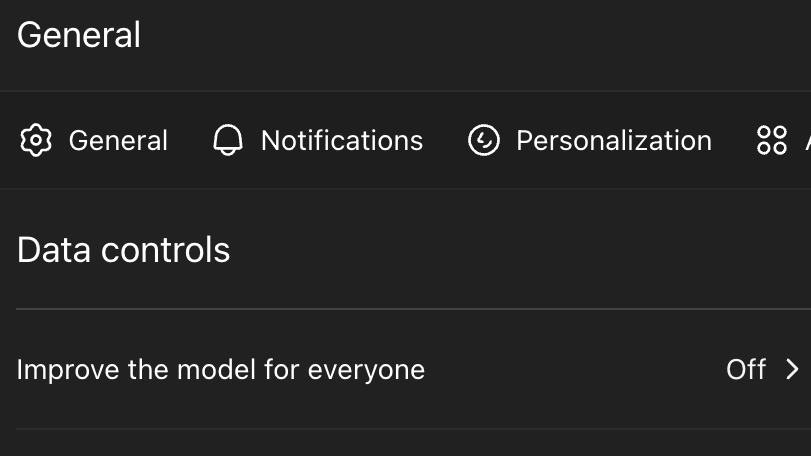
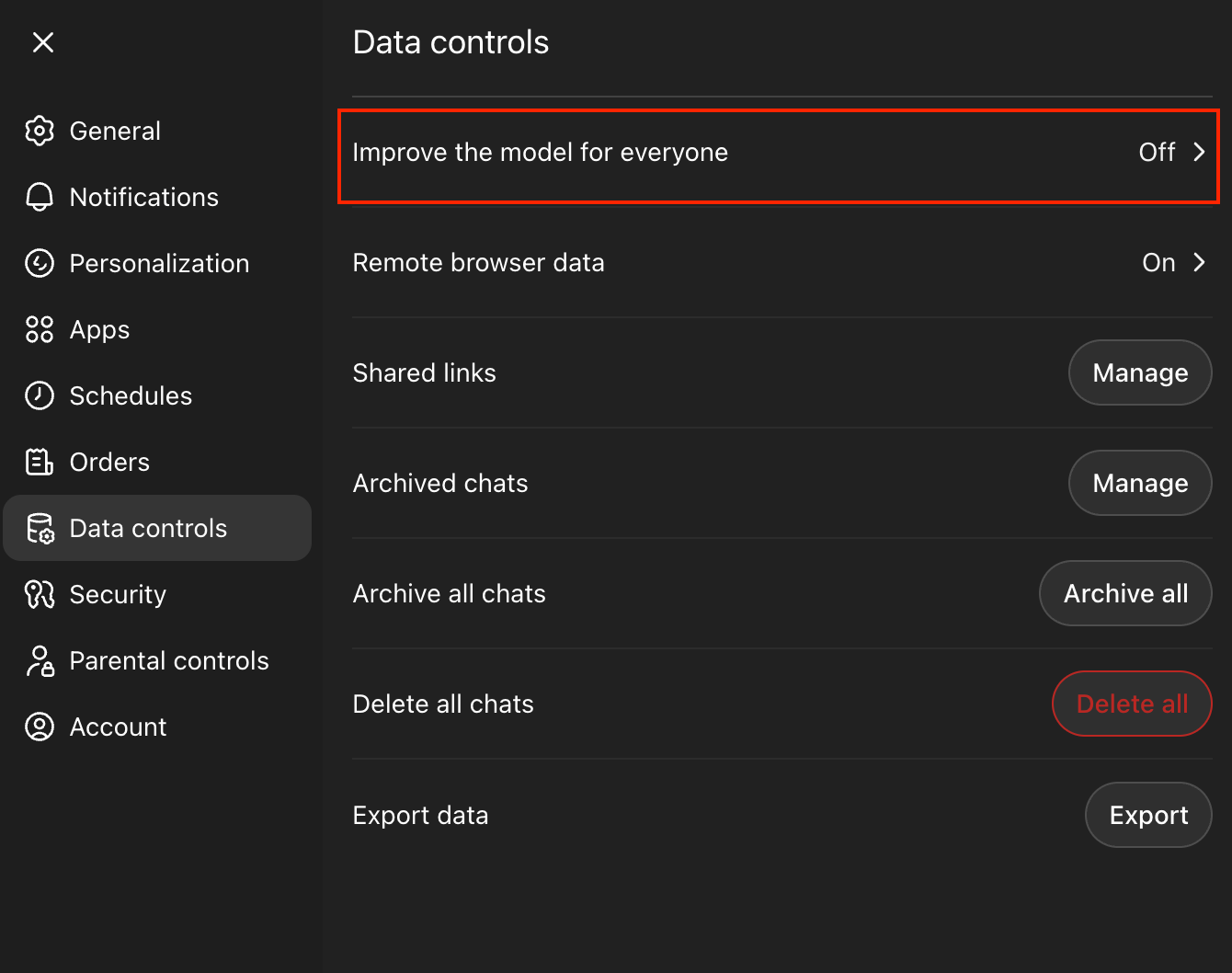
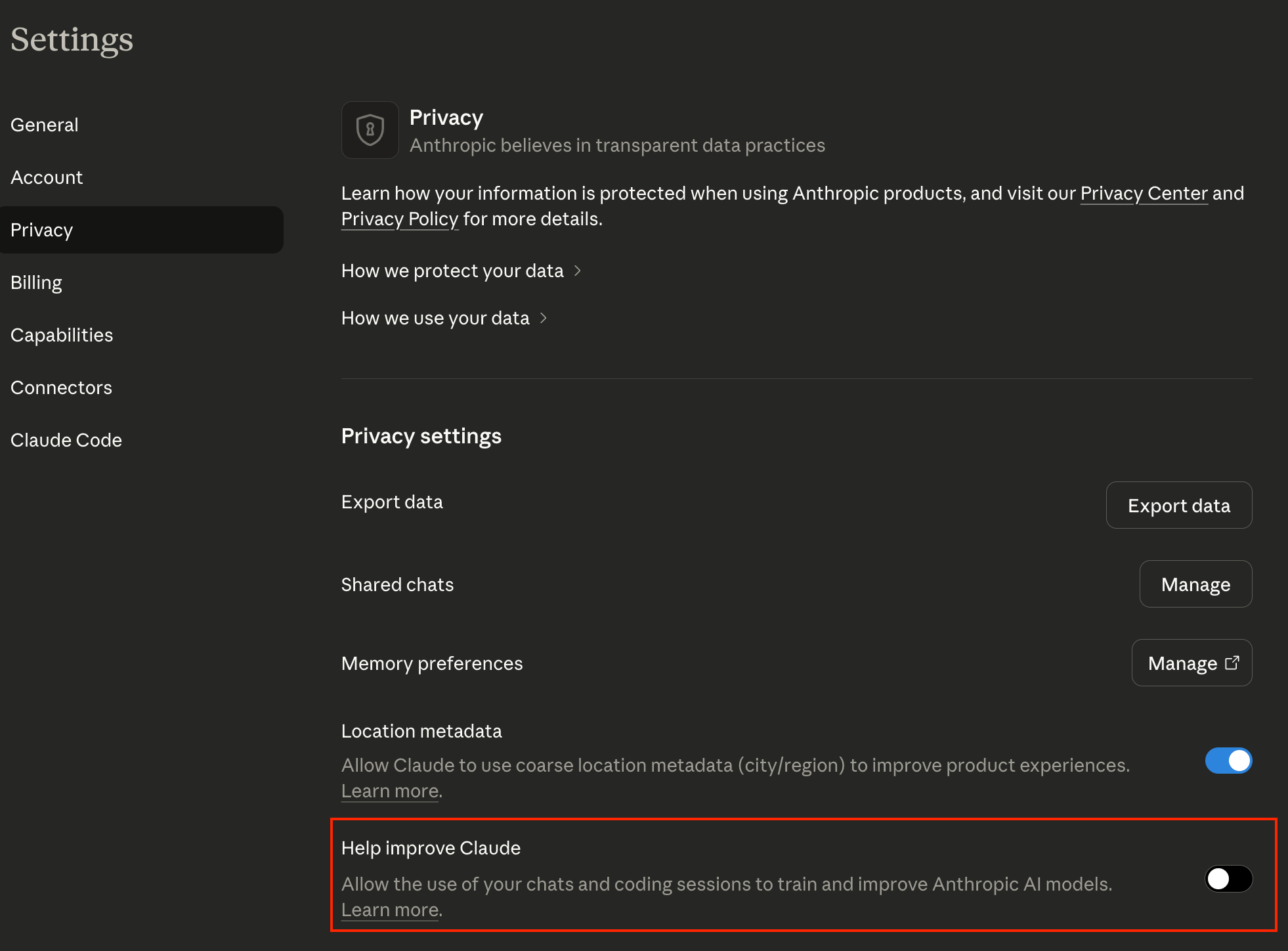
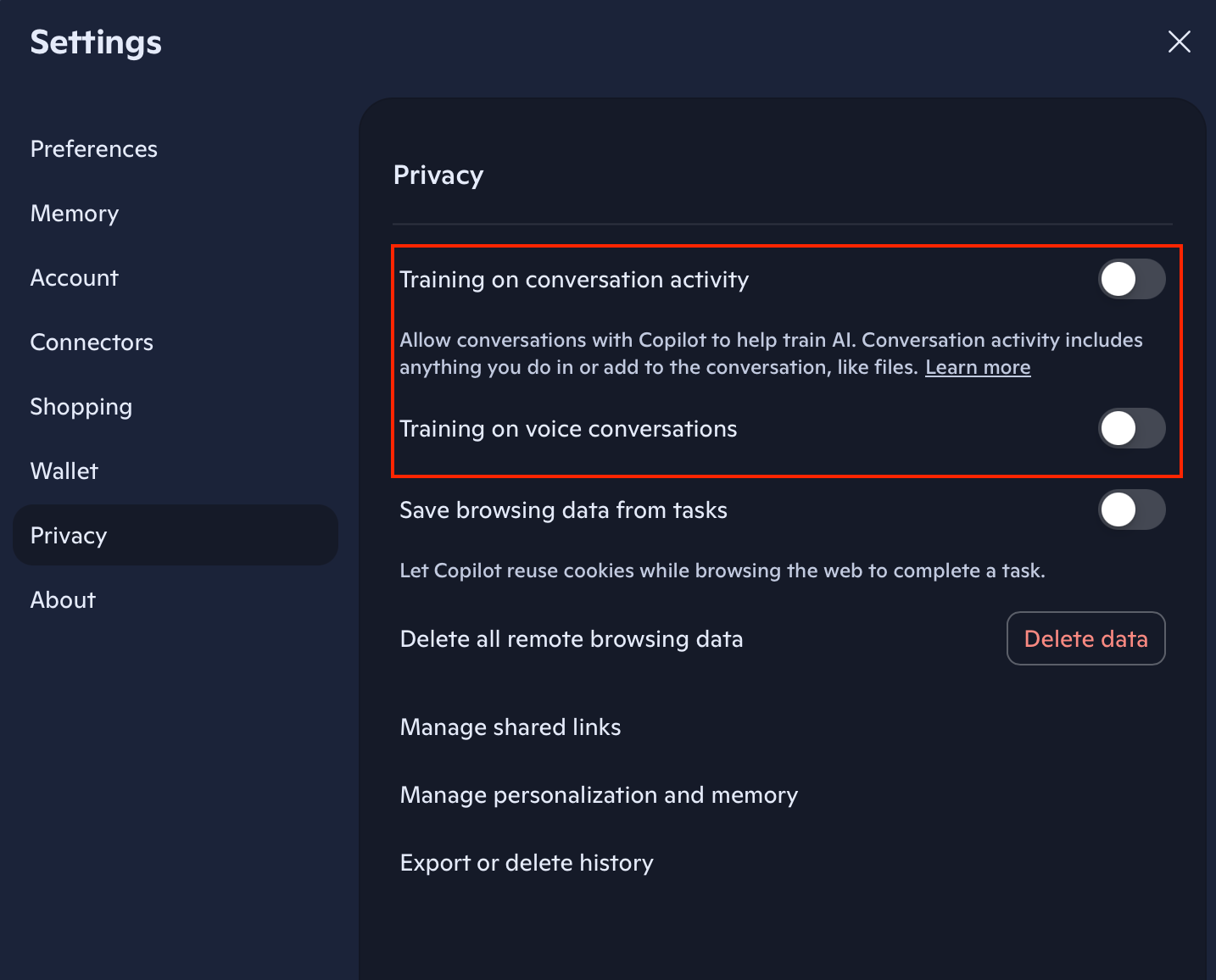
A setting many people miss is the ability to turn off using your data to train the models. Here is how you can do that for ChatGPT, Claude and Copilot. Go ahead and do it now.
Turn off model training in ChatGPT under settings:
Turn off model training in Claude under settings:
Here is the setting for personal Microsoft Copilot under settings:
If you’re on an admin for a team or enterprise license, there is a similar toggle and additional related settings in the organization settings for these tools.
Paying for access to AI tools like ChatGPT, Claude, and Copilot is now a requirement for business at all sizes. It’s not a place to cut back or look the other way. This is what it takes to run a modern business responsibly.
This new baseline can be complicated to navigate. If you need help figuring out the correct product, license levels, or helping your team learn to change how they work, let’s grab some time to discuss your needs.