
Two more things I've handed off to Copilot Cowork
Junk email. Client agreements. Now with mobile access. Two more tasks I've handed off to Microsoft's Copilot Cowork Agent. · Read more →
Microsoft’s Copilot Cowork agent continues to be a small but impactful agentic partner in my day-to-day work. Since Cowork was first enabled in my environment at the end of March, the agent continues to be helpful in a way I was not expecting.
Since my last post, my initial ideas to get running continue to prove useful. The meeting preps for new contacts have been extremely helpful taking the research and prep time off my plate before I get on calls. My Friday morning reviews make sure I can close out my week without missing any commitments. Drafting emails continued to give me something to react to rather than staring at a blank email. Check out the previous post to learn more.
I’ve found some new ways to have Cowork help me in my day-to-day.
I’ve built an AI-driven junk email handler. I have an email that has been flooded with cold sales emails, marketing, and the most random outreach. Microsoft’s quarantine and junk filters catch a lot but I get anywhere from 15 to 30 a day of just trash. No amount of spam reporting, blocking or unsubscribing fixes it. I’ve just gotten used to starting my day swiping away messages.
My scheduled copilot Cowork agent now intelligently reviews my inbox and deletes what it considers junk.
It sends me a report I can skim of what was deleted and why putting things into different categories. After running this for about a month, it literally has not trashed one real or important thing. If it misses something, I give the agent more information about what it missed and it adjusts. As much as I’ll miss mindlessly deleting emails, I just don’t really think about it anymore.
The next example is one that really took a real administrative task off my plate.
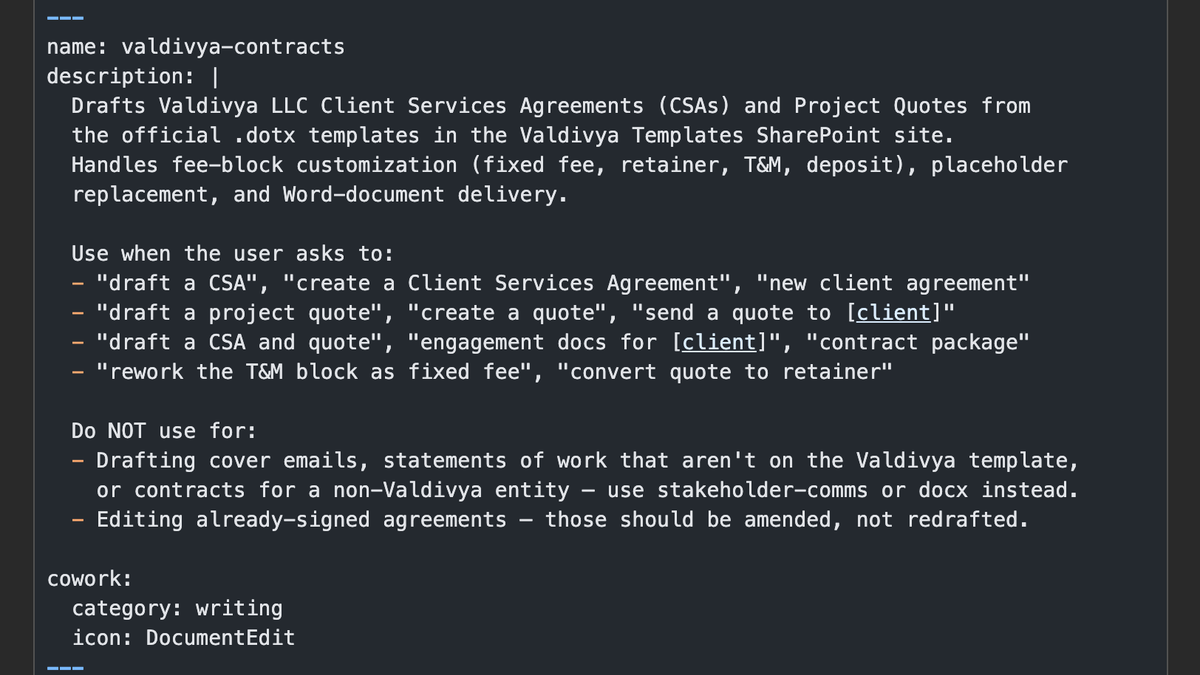
I’ve built up a skill to put together my Client Service Agreement and Project Quotes based on my templates.
I fed the agent a call transcript, bullet points, or project details I’ve already defined separately in Claude. Then I started working with the agent to take a pass. It correctly identified the placeholders, found client information, and asked questions when it wasn’t sure. It puts together the documents, creates a PDF for signatures, and drafts an email into Outlook.
Based on that successful first experience, I asked it to create a skill to inform its approach with fewer answers needed for the basics. It can reference that skill based on some basic triggers to kick it off with less back and forth in the future.
One thing that was missing for me was the ability to kick off any of this away from my desk. Microsoft has solved that problem with the release of updates to the iOS and Android apps to allow you to converse with Copilot Cowork from a mobile device.
This must be what it feels like to have an assistant managing my email and admin work. I love that I can kick it off away from my desk, running 100% in the cloud without needing a machine running back home.
Here is how easy it is to get a Cowork skill set up:
- Prompt Copilot Cowork to complete a task
I'd like your help to put together the Client Service Agreement and a Project Quote for Acme Academy. What do you need to know to get started? - Once you’re satisfied with the output, prompt Copilot to create a skill.
Based on this conversation, help me set up a skill to make creating client service agreements and project quotes easily in the future. - The skill will then be saved by Cowork and allow you to trigger it in the future.
At the end of the day, I’m still doing the real work. It’s maybe saving me an hour or two a week. That’s up to two weeks a year. As an independent that time really adds up. This isn’t the exciting or interesting parts of my work. It maybe feels productive to check the boxes for these tasks but it’s not that fake productivity.
A big part of making this all work is the right setup in your environment.
If your team doesn’t know the right template to use, your agent can’t either. I see a lot of environments carrying technical and operational debt across their workflows and this is now costing them more than ever. It takes strategy and time to get your organization set up but it’s worth the investment to get your team working at their best. Help them each get their own assistant.