
Housekeeping in Jira: Free Guest User Accounts
External users don't have to cost you a full seat. Jira and Confluence guest accounts are a licensing win. Here's how it works. · Read more →
A little talked about feature is the ability to add free guests to your Jira & Confluence spaces. In fact, as part of starting this post about Confluence, I learned guests in Jira had been made available. It’s an easy way to keep the almost full functionality of Jira & Confluence in front of users without having to pay for the full license cost.
This cleanup and realignment of your paid users can have a real impact on your monthly spend and open up opportunities to integrate more features for your paid users.
For accounts that only need access to one space, there is the potential for a huge amount of savings. For Confluence that means, anywhere from $5 to about $10 per user per month. For Jira, that can be something like $8 to $15 per user per month!
It also gives you the opportunity to add third-party apps without having to pay for your external users. I’ve had to decline adding many paid apps to systems due to the increased costs for external users that do not use those features. There is even more savings if you’re already paying for marketplace apps in your Jira or Confluence instance!
It’s really a great setup to allow access to external clients so they can collaborate with your team without having to make Confluence pages or Jira project spaces public.
Jira and Confluence allow up to 5 free guests per paid account. So you will need to have a consistent amount of paid users.
This feature is a real savings to consultancies, agencies, and any group collaborating with outside of the organization users. I’ve found myself in many work environments over the years where I’ve worked closely with clients and being able to pull them into my work space and tools has always helped us collaborate as colleagues rather than a client to vendor situation.
This is a huge win for the types of organizations I’ve worked with. I also think it will help shift the marketplace ecosystem in a positive direction. In multiple organizations, I’ve personally been the decision maker for third-party Marketplace apps and many times have had to decline to proceed due to the cost. In the web and marketing agency world, you may have 100 internal users and 500 client users. Adding a plugin is 5x the cost and that rarely makes sense for a feature only internal users will have access to.
The cleanup efforts I’ve written about for archiving old projects and cleaning up old, unused apps are necessary steps to a healthy Atlassian environment. The effort to organize your users and setup guests isn’t easy either. It can mean unwinding your permission and groups setup, training users on setting up access, and helping external users with a shift in their level of access. It can also mean consolidating spaces to make sure a client has access to everything they need in one space.
There is real ROI to putting in the time and effort to convert to guest users. There is the opportunity to get 5x your paid users back monthly. These efforts also create a more productive, easy-to-use, and collaborative environment for your users which pays real dividends in their ability to find work and get things done.
There are some heavy restrictions on the usage to be aware of before you try and convert your whole team.
This feature is designed for users external to your organization. It truly has to be guests and not accounts that are managed by your organization.
I’ve also encountered some odd restrictions in Confluence. For example, guest users cannot export to Word or PDF. They can’t set any restrictions on content in the space. They also can’t use the mobile confluence app. Not deal breakers by any means but odd exclusions given the breadth of features that are included.
Because I just found this feature in Jira, I’m just digging into it but I like what I see. Atlassian provides a list of Guest Permissions in Jira. So far, everything behaves like I’d expect with a guest user being able to add tickets, comment on tickets, add attachments and be assigned tickets. Realistically, this is going to cover most external users workflows. Unlike confluence, looks like you can manage access through groups too. I’m sure I’ll find some speed bumps as I dig deeper, but so far so good.
For most external users, this is a good enough setup that helps bring people into your world without having to pay for a full seat for the occasional access.
If you want to dive into this idea on your own, here is how you get started.
How to add guests uers to your Atlassian environment
- Go to the admin -> Directory -> Invite users
- Enter their email address
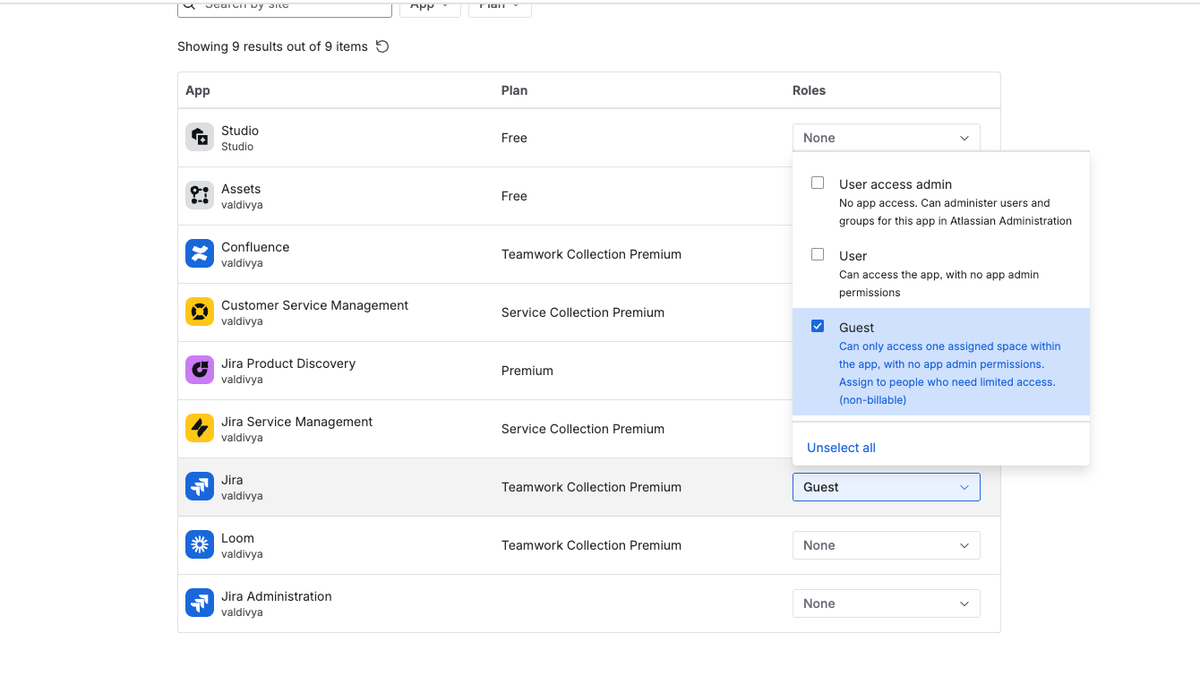
- Under App, select Jira and Confluence and open the Roles dropdown for each
- Select Guest from the list of options
Once you’ve added the guest, you’ll need to add them directly to a space. Unfortunately, you have to add each guest to the space individually. You can’t leverage groups to automatically create accounts and give access to the spaces. It’s another small speed bump but worthwhile for a free user.
How to add a guest users to a space
- Open your Confluence or Jira Space
- Go to space settings
- For Confluence
- Navigate to space access -> Guests. Click the Edit button
- Add the new user from the previous set of steps and select the permissions you want to give them in that space.
- For Jira
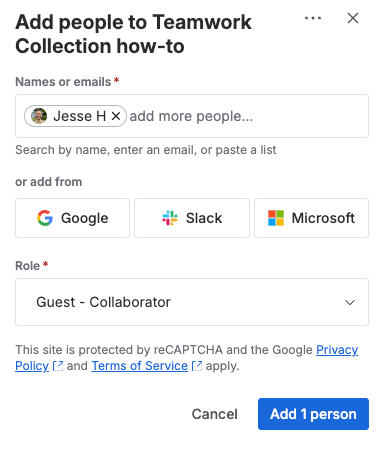
- Navigate to Access -> Add people button
- You’ll need to select the Guest - Collaborator role for the individual or a group. I would suggest using a group.
Don’t forget to add guest user audits and cleanup to your review process. I would suggest reviewing quarterly and disabling users that haven’t signed in for three months to keep your free guest access available and your data secure.
Keep in mind, you can only add a guest user to one space. If they need access to more than one space, you’re going to need to pay for a seat for them.
I love figuring out how to simplify environments, save money, and empower collaborative teams through these tools. If you don’t have the bandwidth to jump into this one, I’m ready.